Guest Information
Every name in the seating chart has a form behind it. It opens from a guest's name, from the button that adds a guest, and from a seat, in the tab or in a table's panel: a free seat opens a blank form already placed on it. One column scrolls through the four sections; the list on the left says where you are and jumps where you click.
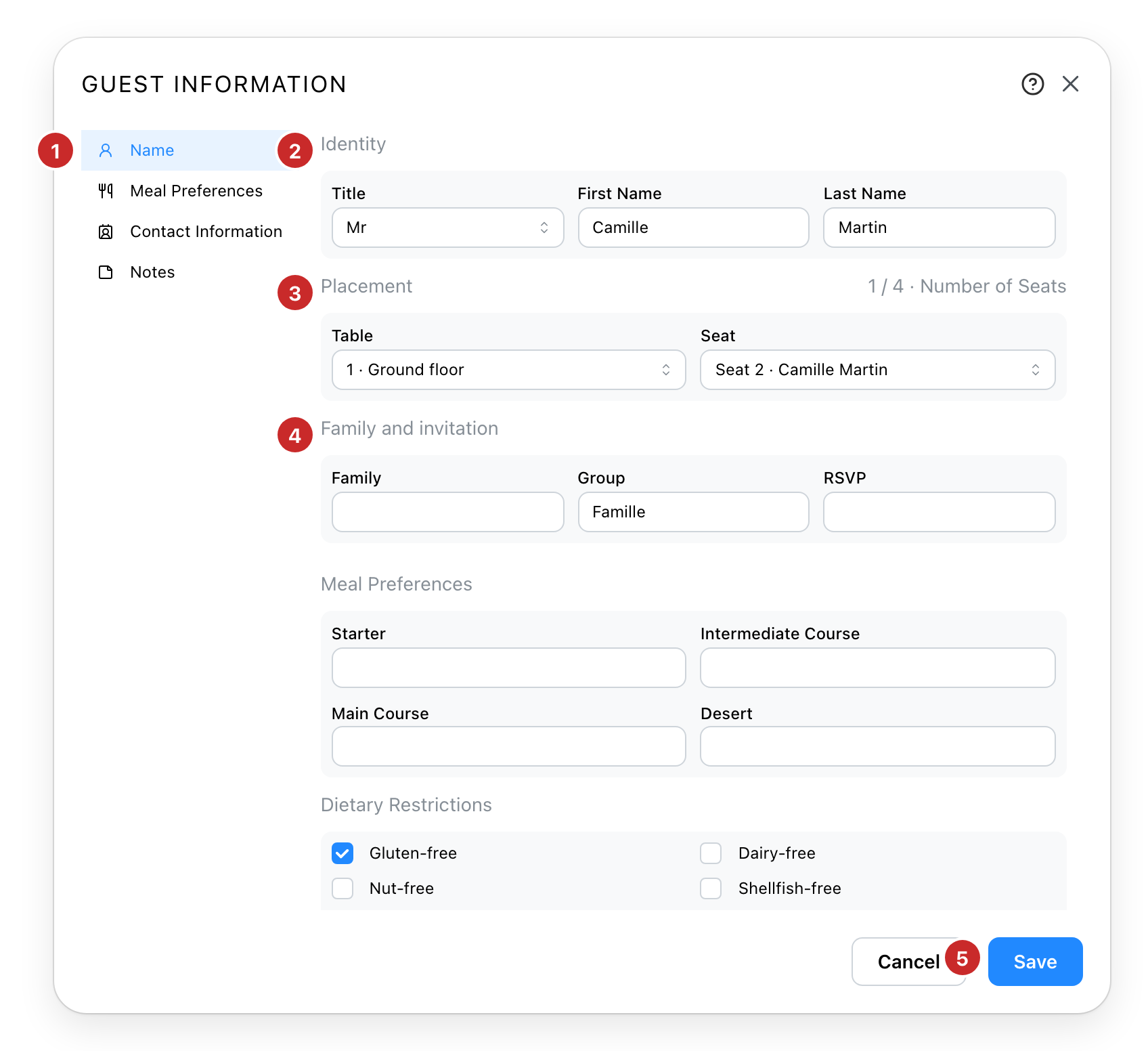
- The sections. Name, Meal Preferences, Contact Information, Notes. Click one to scroll to it; it follows as you scroll.
- Who. The title and the name. The name is how the list knows a guest, so a second guest with the same name is pointed out.
- Where. The table and the seat, with what is free; the count beside the title is the table's seats taken.
- With whom. Family, group and reply, each offering what other guests already have.
- Save. Nothing is written before it, and Cancel leaves the guest as they were.
The name
A guest is their name. The seating chart finds them by it, and so does an Excel import, in any
case and with or without accents, spaces or hyphens: Léa Dubois, lea dubois and
LÉA DUBOIS are the same guest. The form warns when another guest already has the name, and
lets you save anyway, because two people can share one.
A guest needs at least one detail to be saved, and the title alone does not count. The title decides the colour behind the name on the plan, when the colours by title are on.
The seat
The table list offers every table of the project, with its level; the seat list shows what is free and who sits where, and a taken seat cannot be chosen. Choosing a table takes its first free seat, and the seat can then be changed. Choose Unassigned in the table list to keep the guest among the unassigned.
This is the way to seat a guest without dragging.
Meals, contact, notes
The meal section takes the four courses and the dietary restrictions; the contact section the email, the phone and the address; the notes anything else. The family, group, reply, course and address fields offer what other guests already have, so a starter typed once is a click for the next guest.
All of it goes into the Excel export and comes back from an import.
See also
- The Seating Chart tab, where the guests are listed and seated by drag.