Best Home Design Software: From Sketch to Permit
Designing a home involves multiple stages, from the first sketch to building permit documentation. Here are the best software tools for each phase of the process.
Designing a home involves multiple stages, and no single 3D home design software covers everything perfectly. From the initial sketch to 3D visualization, cost estimation, and building permit documentation, each phase has different requirements.
This guide walks through the best home design planning software for each stage of the process. Whether you're a homeowner planning a renovation or someone looking for the best software to design house plans from scratch, you'll find an easy-to-use tool for your needs.
The 4 Phases of Home Design
Before choosing software, it helps to understand the four main stages of a home design project:
| Phase | What happens | What you need |
|---|---|---|
| 1. Sketching and layout | Draw walls, define rooms, test different layouts | Floor plan software with 2D/3D views |
| 2. Visualization | See what your design looks like in 3D, generate images | 3D rendering or AI visualization tools |
| 3. Cost estimation | Estimate construction costs based on areas, materials, openings | Estimation software or spreadsheets |
| 4. Building permit documentation | Produce site plans, cross-sections, elevations, area calculations | Software with export capabilities (PDF, DXF) |
Some tools cover multiple phases. Space Designer 3D, for example, handles phases 1, 2, and 4 in a single browser-based platform.
Phase 1: Sketching and Floor Plan Design
This is the creative stage where you define the layout of your home. You draw walls, place doors and windows, arrange rooms, and test different configurations. Precision matters less than flexibility at this point.
Software Comparison for Floor Plan Design
| Feature | Space Designer 3D | SketchUp | Planner 5D | Sweet Home 3D | Rhino 3D | Revit |
|---|---|---|---|---|---|---|
| Designed for floor plans | Yes | No (general 3D) | Yes | Yes | No (general 3D) | No (BIM) |
| Ease of use | Easy | Moderate | Easy | Easy | Advanced | Advanced |
| Auto measurements | Yes | No | No | No | No | Yes |
| 2D/3D sync | Real-time | Manual | Real-time | Basic | Manual | Real-time |
| Furniture catalog | 5,000+ items | Via 3D Warehouse | 8,000+ items | 10,000+ items | No | Limited |
| Web-based | Yes | Yes (limited free) | Yes | Yes (WebGL) | No | No |
| Free plan | free plan | Education only | Yes (limited) | Yes (fully free) | No | No |
| Best for | Home design, all levels | 3D modeling enthusiasts | Quick visual layouts | Budget DIY | Parametric design | Large BIM projects |
Space Designer 3D: Draw, Furnish, and Visualize Your Home in 3D
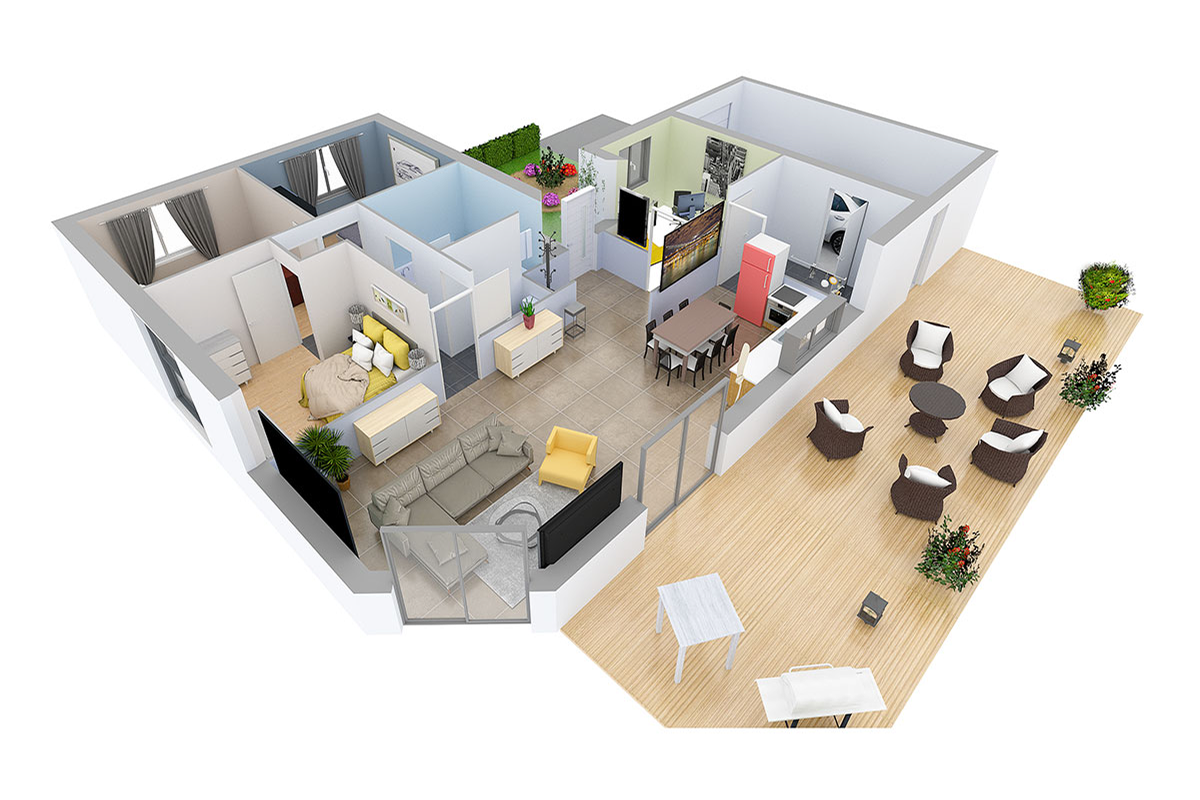
Space Designer 3D is a browser-based home design software used by over 6 million people worldwide since 2010. It was built specifically for floor plan design and interior planning, making it accessible to homeowners without any architectural background. See what that looks like in this single-story family home with open-plan living, designed entirely in Space Designer 3D.
Key features for the sketching phase:
- Auto measurements: Dimensions update in real time as you draw walls, place doors, or move furniture.
- Instant 2D/3D sync: Every change in the floor plan is reflected immediately in the 3D view.
- Sun orientation: Enter your real address to simulate natural light at different times of day.
No download or installation required. The free plan lets you start designing immediately. Highly rated on Trustpilot. Paid plans (Premium, Ultimate, Team, Business, Enterprise) add advanced features like 8K rendering, DXF export, and team collaboration.
Try Space Designer 3D for Free
SketchUp: General-Purpose 3D Modeling
SketchUp is a widely used 3D modeling tool, now owned by Trimble. It's not designed specifically for floor plans, but its flexibility and access to the 3D Warehouse (millions of community models) make it popular with design enthusiasts.
Strengths: Flexible 3D modeling, large community, LayOut for 2D documentation. Limitations: Steep learning curve, no auto measurements for floor plans, no free plan for general users (education only), photorealistic rendering requires a paid Studio plan.
Other Professional Tools
For users with advanced needs, these tools serve specific purposes:
- Rhino 3D: Powerful parametric design with the Grasshopper plugin. Best for architects exploring complex forms. Advanced learning curve.
- Revit: Industry-standard BIM software for large construction projects. Handles detailed documentation and project management, but too complex for the initial design phase.
- AutoCAD: Primarily used for detailing architectural elements. Labor-intensive for 3D home modeling.
- Blender: Free and open-source 3D tool. Powerful but challenging interface. The Building Tools and BlenderBIM plugins add architectural capabilities.
Phase 2: Visualizing Your Design
Once your floor plan is ready, you need to see what it looks like in 3D. This phase helps you make decisions about materials, colors, furniture, and lighting before committing to construction.
Built-In 3D Rendering
Space Designer 3D includes photorealistic rendering up to 8K resolution. You can adjust lighting, textures, and the environment, then generate images directly in your browser. The sun orientation feature simulates real daylight based on your address, producing realistic lighting effects. You can see this rendering quality in finished projects like this modern luxury villa in Dubai with pool and garden.
AI Visualization Tools
AI tools can generate realistic or artistic impressions of your designs from screenshots or descriptions:
- DALL-E (included in ChatGPT): Generate images from text descriptions of your design.
- MidJourney: Create artistic architectural visualizations.
- Stable Diffusion: Open-source image generation with architectural plugins.
These tools complement your floor plan software. They don't replace it, but they help present ideas to family members, contractors, or clients.
Phase 3: Estimating Construction Costs
Before breaking ground, you need a realistic budget. Professional estimates are ideal, but you can start by gathering key measurements from your floor plan:
- Living area by room.
- Total gross area.
- Heights of different levels.
- Number and dimensions of doors and windows.
- Roof surface area and type.
Cost Estimation Tools
- Houzz Pro: Comprehensive project management with cost estimation.
- Clear Estimates: Detailed cost breakdowns for residential construction.
- Estimator 360: Cloud-based estimation with material databases.
Space Designer 3D helps with this phase by providing accurate measurements and area calculations that you can export and use as input for estimation tools.
Phase 4: Building Permit Documentation
Getting a building permit requires specific documents that demonstrate your project's compliance with local regulations. Requirements vary by country and municipality. Many of these documents can be generated directly in Space Designer 3D.
Required Documents
| Document | What it shows | Can Space Designer 3D generate it? |
|---|---|---|
| Site plan | House position on the plot, boundaries, access points | Partial (2D layout exportable) |
| Floor plans | Internal layout of each level, walls, doors, windows | Yes |
| Cross-sections | Vertical cuts showing structure, floor levels, ceiling heights | Yes |
| Elevations | External facade views, roofline, materials | Yes |
| Before/after photos | Existing state vs. proposed changes (renovations) | No (use real photos) |
| Gross and net areas | Total building measurements by floor and space type | Yes (auto-calculated) |
| Descriptive text | Project explanation, materials, energy compliance | No (written document) |
| Administrative forms | Region-specific compliance forms | No (provided by local authority) |
Space Designer 3D exports floor plans, cross-sections, and elevations in PDF and DXF formats, which are compatible with CAD software for further adjustments if needed.
See All Space Designer 3D Features
Before You Start: Write Down Your Goals
Before opening any software, take a few minutes to list your priorities and constraints. This will guide every decision you make:
- Natural light: Which rooms need the most sunlight?
- Noise: Do any rooms need soundproofing (home office, music room)?
- Work from home: Do you need a dedicated office space?
- Budget: Are multifunctional spaces a priority?
- Sustainability: Are energy efficiency and eco-friendly materials important?
Having these written down will help you make better layout decisions in any software you choose.
Get Started with Space Designer 3D
Space Designer 3D covers three of the four phases of home design (sketching, visualization, and documentation) in a single browser-based tool. No download. Over 6 million people have used it since 2010. For inspiration, browse finished designs like this geometric contemporary villa with pool.
Frequently Asked Questions
Can I Design My House Without Hiring an Architect?
It depends on local regulations and the scope of your project. In many countries, projects below a certain surface area threshold do not legally require an architect. Tools like Space Designer 3D let you draw floor plans, visualize your design in 3D, and generate documents for building permit applications. Always check your local requirements before starting. Consulting a professional is recommended for structural verification and complex projects.
What Is the Best Home Design Software for Beginners?
Space Designer 3D and Planner 5D are the easiest to learn. Both let you draw walls, place furniture, and switch to 3D without any training. Space Designer 3D adds automatic measurements. Sweet Home 3D is another option if you prefer a fully free desktop application.
What Is the Difference Between CAD and BIM Software?
CAD (Computer-Aided Design) software draws architectural elements as lines and shapes without material or construction data. BIM (Building Information Modeling) software models objects with detailed properties including materials, costs, and timelines. AutoCAD is CAD. Revit is BIM. Space Designer 3D focuses on floor plan design and visualization, sitting between the two.
Which Software Is Best for Quick Design Sketches?
Space Designer 3D is designed to draw the way you sketch on paper. Trace walls freely, cross them, move them, test layouts without constraints. No need to draw perfect lines from the start: the tool adapts to your thinking, not the other way around. Measurements and formatting are calculated as you go. SketchUp is good for general 3D sketching. Rhino 3D with Grasshopper suits users who want to explore parametric design.
Can I Use Space Designer 3D for Building Permit Drawings?
Yes. Space Designer 3D generates floor plans, cross-sections, and elevations that can be exported in PDF and DXF formats. These documents cover a significant portion of what local authorities require for building permit applications.
How Can I Estimate the Construction Cost of My House?
Start by gathering key measurements from your floor plan: living area by room, total gross area, floor heights, door and window dimensions, and roof specifications. Tools like Houzz Pro, Clear Estimates, and Estimator 360 can then calculate approximate costs based on materials and labor.
Is Space Designer 3D Free?
Yes, Space Designer 3D offers a free plan. Paid plans (Premium, Ultimate, Team, Business, Enterprise) add advanced features like 8K rendering, DXF export for CAD software, and a custom product catalog for professionals. See pricing.
What Software Do Architects Use for Home Design?
Professional architects typically use a combination of tools: SketchUp or Rhino 3D for conceptual modeling, Revit or ArchiCAD for BIM documentation, and Photoshop or AI tools for visualization. Space Designer 3D is increasingly used by architects for client communication, as it lets non-technical clients visualize and interact with the design. Over 6 million people have used it since 2010, highly rated on Trustpilot.
More from the Blog
Space Designer 3D Turns 16: A Look Back at Its 5 Versions
In May 2026, Space Designer 3D turns 16. A look back at how the platform evolved, from the first room ever drawn in a web browser in 2010 to today's multi-device, AI-augmented edition.

AI-Powered Workspace Design: Smarter Office Layouts
AI is changing how offices are designed and managed. Here is a practical look at the tools and methods reshaping workspace planning, and how to test layouts before committing to them.
Best Floor Plan Software in 2026: 7 Tools Compared
Looking for the best online floor plan software? We compared 7 tools side by side: features, pricing, 3D quality, and ease of use. Find the right one for your project.
Design Your Floor Plan in 3D
Join 6M+ users. Draw floor plans, furnish rooms, and visualize them in 3D directly in your browser.