Sections
A section is a line you draw across the project, and a way of looking at it. The line says where to cut; the view shows the building sliced along it, with everything in front of the cut taken away.
Draw one with the section tool, then use this panel to name it and to look through it.
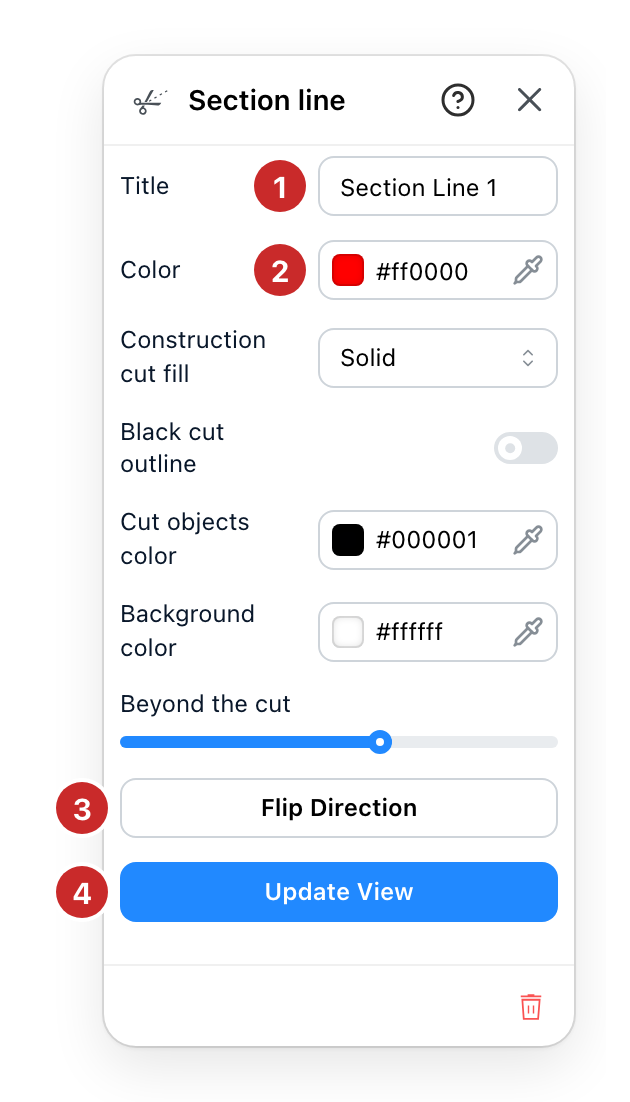
- Title. The name the section carries on the plan and on the drawing it produces. A-A and B-B are the usual convention, and the name is what tells two sections apart on a printed set.
- Color. What the cut line is drawn in. Worth changing when two sections cross, so the plan says which line belongs to which drawing.
- Flip Direction. Which way the section looks. A cut has two faces and this swaps them. Use it when the view shows the half you did not mean to keep.
- Update View. Looks through this section. The project is clipped at the line and the camera is placed square onto the cut. It is offered only while you are looking at something else, because it is the way in.
Only one section is looked through at a time: opening this one closes the last. Leaving for the plan or for 3D puts the whole building back, and so does changing version. Flipping or moving the line while you look through it moves the cut and the camera with it.
Between the colour and the buttons, five rows decide what the section view looks like. Construction cut fill fills the cut walls and floors solid or hatched. Black cut outline draws a black edge around what the cut goes through. Cut objects color is the colour of the furniture and objects the cut passes through, and Background color the colour behind the drawing. Beyond the cut fades what lies past the cut into the background: at 0 it is fully drawn, at 100 it is gone.
Some sites offer a Style as well, just after the colour. It decides what the cut surfaces are filled with and what sits behind them, and it appears only where more than one has been set up for your site.
The trash at the foot of the panel deletes the section. The line goes, the project does not.
See also
- Drawing Tools is where the section line is drawn in the first place.
- Levels decide the heights the cut passes through.