Layers
A layer is a name an object carries so that it can be shown or hidden with everything else that carries the same name: the furniture of one department, the temporary stands, the things that are only there for the second day. The layers button in the control bar opens the list, on plans that include layers.
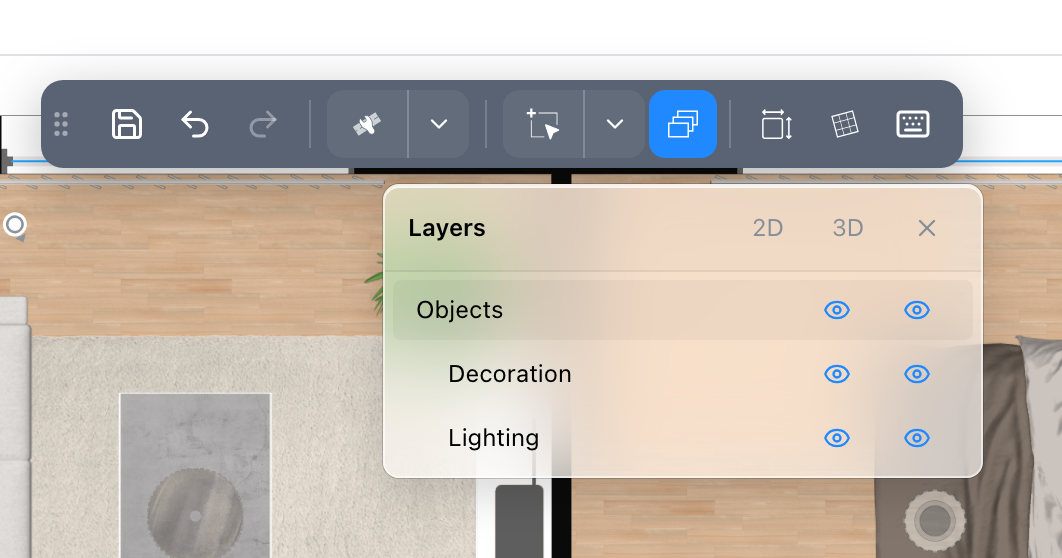
The list opens beside its button and stays open while you draw. It moves by its header, and closes with its cross or with the button. Each row has two eyes, one for the 2D plan and one for the 3D views. Close an eye and what is on that row leaves that view; open it and it is back. Nothing is deleted either way, and the project remembers which eyes were closed. An eye that cannot be clicked is a kind of thing that has nothing to show in that view.
The rows come in groups. Objects holds the catalogue objects, with one row under it for each layer name you gave; then come Custom Pictures, Primitives and Custom Volumes; Annotation Elements holds the dimensions, notes, arrows, pathways, rulers, zones and the rest. Closing the eye of a group closes the eyes of its rows. A row only shows while the project holds something of its kind.
Where a layer comes from
An object is given its layer in its property panel, in the Layer Name field; type a name and the layer exists. Several names separated by commas put the object on several layers, and it stays visible as long as one of them is. A layer with nothing left on it disappears from the list. Double-click a layer name in the list to rename it on every object that carries it.
See also
- Object Properties, where the layer of an object is set.
- Levels split the project by floor; layers split it by anything else.