Catalog
Everything you put inside the shell comes from the catalogue: doors and windows, furniture, fittings, plants. It opens from the chair tile on the left rail, Furnish your project with 3D objects. What it holds depends on your site, so the categories below are an example rather than a list.
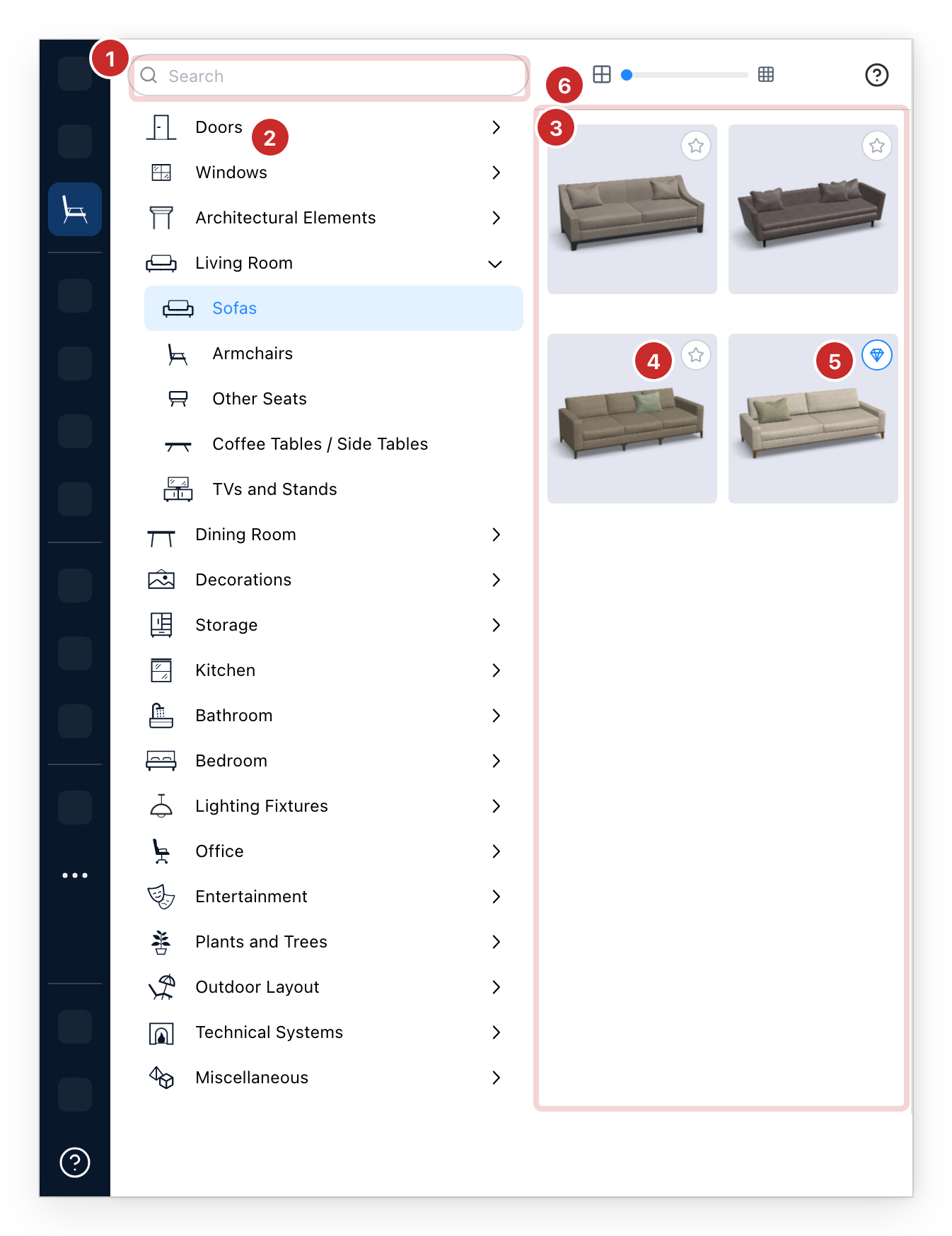
- Search. Across the whole catalogue rather than the category you are in, the results grouped under the name of their category. The fastest way to something you can name.
- The categories. One with an arrow holds more inside; opening it goes a level deeper rather than replacing what you are looking at.
- The items. Drag one into the plan to place it, or click it and then click the plan. A door or a window dropped on a wall cuts its own opening; furniture lands where you let go of it. Hovering a tile gives its full name.
- The star. Puts the item in your favourites, which is where to keep anything you place more than once: they gather under Favorites, above the categories. It is a toggle: starred until you press it again. The star is there once you are signed in.
- The diamond. This item is not in your plan. Clicking it says which plan would include it, or asks you to log in first when you are not; until then the tile cannot be dragged into the project.
- Thumbnail size. Smaller tiles when you want more of a category on screen at once. The arrow before it closes the list of items, clears the search, and leaves the categories alone on screen.
See also
- Drawing Tools build the shell the catalogue furnishes.
- Materials change what a surface is made of.