The dashboard
The dashboard is the page that opens after you sign in. It holds your projects: you create a project there, find it, open it and share it.
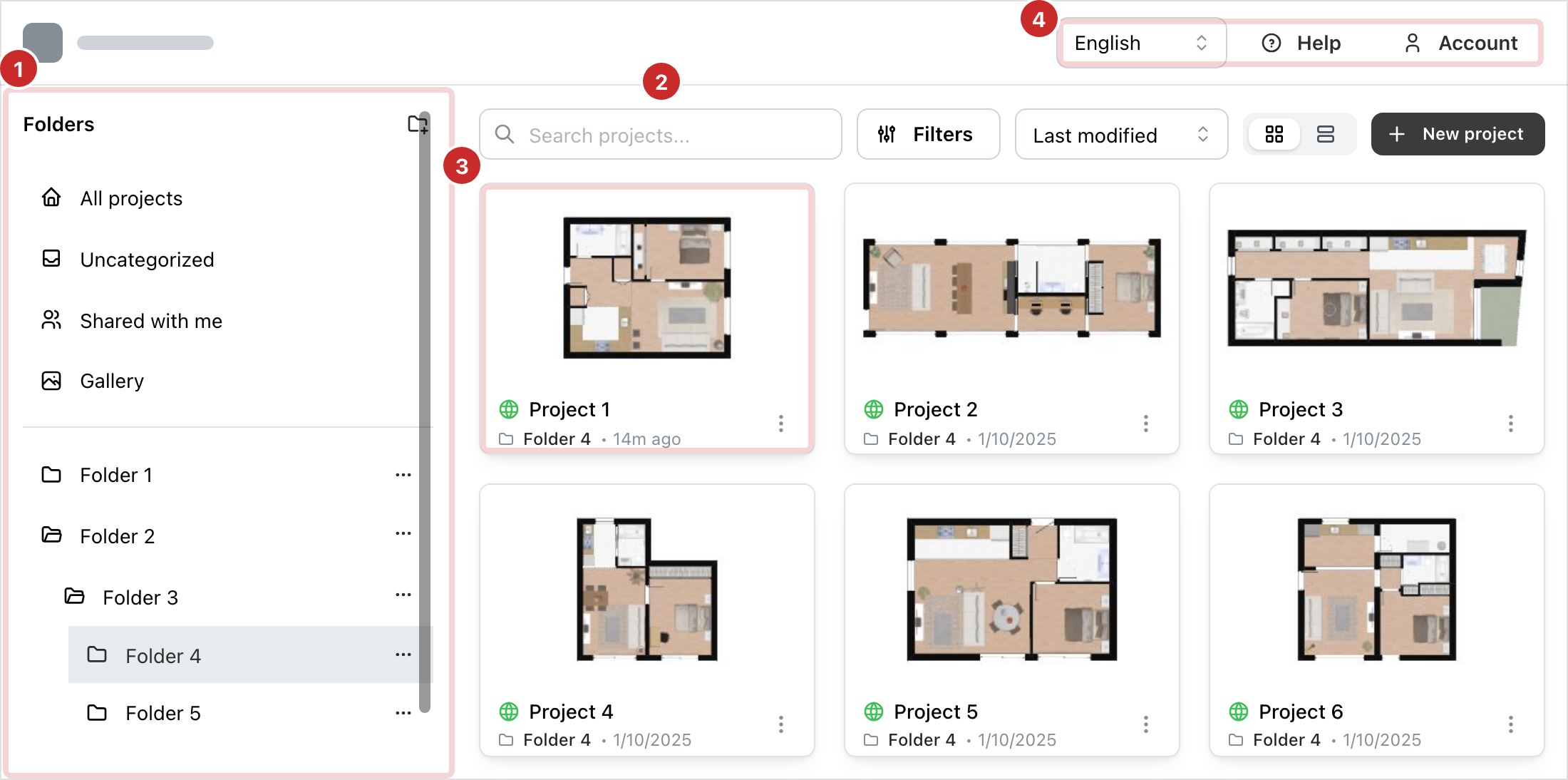
- The folders. The left column: all your projects, the ones in no folder, the ones shared with you, your gallery, then your folders. See Folders.
- The tools of the list. Search, filter, sort, show as cards or as a table. New project, below, opens the creation of a project. See Finding a project and Create a project.
- A project. Its card shows its picture, its title, its visibility, its folder and its last change. Over the picture, the pencil opens the project in the editor and the gear opens its information. The three dots open its menu: see The project menu.
- The top bar. The language of the interface, Help, which opens these pages, and Account, which opens your account: see Your account.
The messages above the list
- Your email address has not been verified yet. Resend email sends you the verification link again.
- Payment past due. Your last payment did not go through. The message's button opens billing, where the card is updated.
- Your site may show its own announcements. The cross closes a message until your next visit.
On a phone
The folder column hides behind the three-line button, top left. Choosing a folder closes it. Help and Account become icons, and New project a + beside the filters.
Help
Help opens these pages inside the dashboard. The left column lists the pages; Projects, at the top of the column, takes you back to your projects. While you create a project, the ? of the window opens Create a project.
In this section
- Create a project: one page per way to start, then the shared steps.
- Folders: sorting your projects, the special folders.
- Finding a project: search, filters, sort, cards or table.
- The project menu: information, visibility, history, copy, deletion.
- Sharing: the project link, inviting a collaborator.
- The gallery: your public projects, at an address of your own.
- Your account: profile, credits, team, billing, security, closing.